
Run the league. Hold the green.

The home for weekly leagues and single- or multi-day tournaments. Set the format once — players post scores from the course and standings update as every round comes in.

Hold the Green live season standings — team and singles leaderboards
1,000s
WAYS TO PLAY
Both
LEAGUES + TOURNAMENTS
Net+Gross
SCORING, YOUR CALL
<5m
TO SET UP AN EVENT

Set up your event once. Then every score, standing, skin, and prize takes care of itself — whether it's a Tuesday nine or a member-guest weekend.

Stroke PlayStablefordModified StablefordMatch PlayNassauSkinsScrambleBest Ball2v2 Match PointsBlind DrawRyder Cup

Mix formats, team rules, and scoring basis into thousands of distinct ways to run an event.

Two models. One system.

Leagues

Weekly nights, points races, and standings that keep themselves from opener to finale.

CadenceWeekly / recurring
StandingsCumulative season
Best forMen's / ladies' nights
Start a league →

Tournaments

Member-guests, scrambles, and championships with flighted fields and live standings.

CadenceSingle event / weekend
FieldFlighted, seeded
Best forMember-guest, charity
Host a tournament →
holdthegreen.app/events/new
The Hold the Green event builder with Caddie: a league described in one sentence, set up and ready to check
FORMATS
1,000s
skins · Nassau · Blind Draw
SCORING
Net+Gross
post a card, or hole by hole
HANDICAP
Auto
running index, or GHIN
SETUP
<5 min
tell Caddie, or reuse a past event

Everything from first tee time to final payout

One page per league

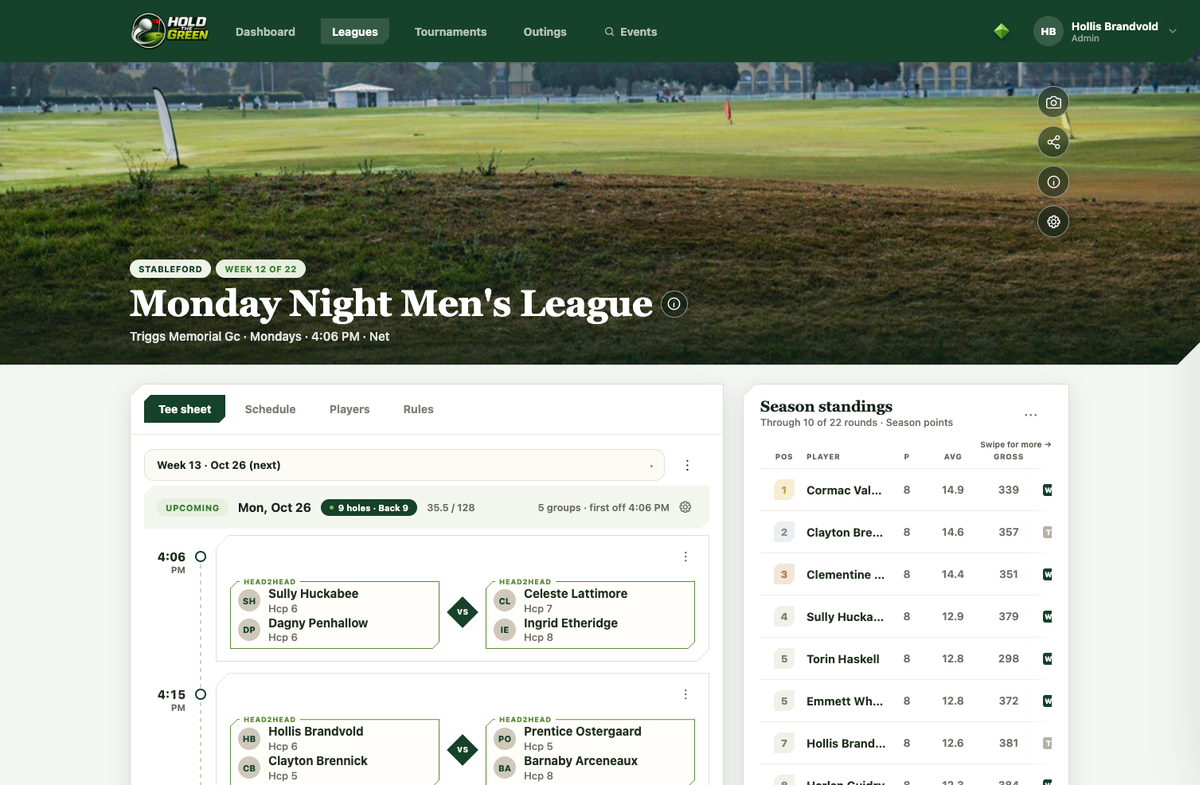
Course, tees, schedule, and format up top; tee sheet, standings, and teams a tap away underneath. Nothing buried in menus.

One page per league

Tee sheet, standings, teams — all together.

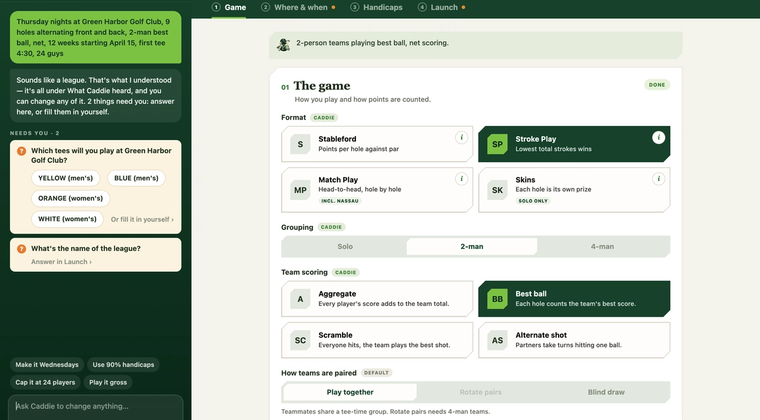
The Game step of the event builder, with each setting Caddie chose tagged CADDIE

Game, Where & when, Handicaps, Launch: four short steps for every league, tournament and outing. Tell Caddie about your event and it fills them in, and every setting stays editable before and after launch.

Four steps, or just tell Caddie

Describe it, reuse it, or build it step by step.

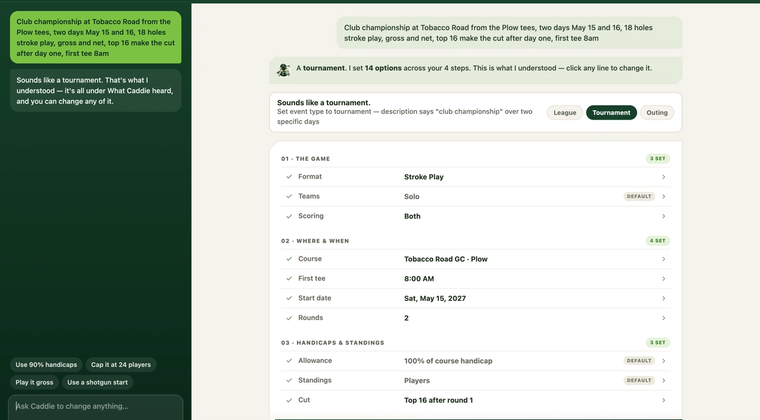
Caddie’s summary of a two-day club championship: stroke play, gross and net, two rounds and a top-16 cut

Club championships, member-guests and charity scrambles use the same four steps: rounds with their own dates and starts, a cut after day one, and gross and net side by side.

Tournaments, built the same way

One builder for leagues, tournaments and outings.

Every round, every flight

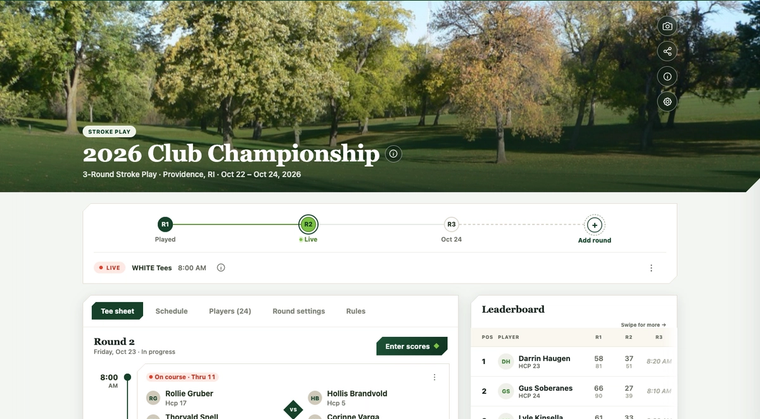
Your position and thru-hole score sit up top; round-by-round status and the full leaderboard underneath — for every flight in the field.

Every round, every flight

Position, rounds, and purse in one view.

Everything, one dashboard

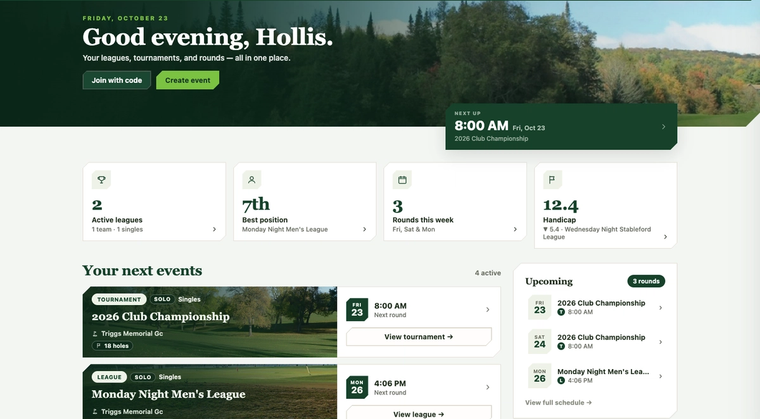
Active leagues, this week's rounds, and season stats greet you the moment you log in — with a league or tournament a couple taps away.

Everything, one dashboard

Leagues, tournaments, schedule, and stats.

Every format handled, out of the box

Live standings

Standings for leagues and tournaments update as rounds are completed — net, gross, or both, team or individual.

Skins, Nassau & Blind Draw

Skins carry over on ties, Nassau splits front, back, and overall, and Blind Draw hides your partner until the round closes.

Handicaps done right

A running index updates after every round, or sync a GHIN number — with true course handicaps by tee and slope.

Tee sheets & pairings

Automatic tee sheets with opponents that rotate week to week, plus RSVPs and easy substitutions.

Prize sheets

Spell out payouts for every way you're scored — separate lists for teams and individuals, net and gross.

Co-organizers & rosters

Delegate event management to trusted helpers, and manage rosters, subs, and claimed profiles with ease.

Caddie, the Hold the Green AI helper: a friendly robot caddie in a green cap, holding a golf club and giving a thumbs up
Meet Caddie

AI does the tedious part. You stay the organizer.

Caddie is the helper built into Hold the Green. Tell it about your event the way you’d text your group and it sets the whole thing up. Snap the paper scorecard and every score is drafted for you. Either way you get a draft to check, never a decision already made.

Tell Caddie about your event

Type it or say it — “Thursday nights at Green Harbor, 9 holes, 2-man best ball, 12 weeks from April 15” — and Caddie works out whether it’s a league, a tournament or an outing, then fills in the game, the course, the schedule and the handicaps.

  1. Describe your event in your own words, or tap the mic and say it
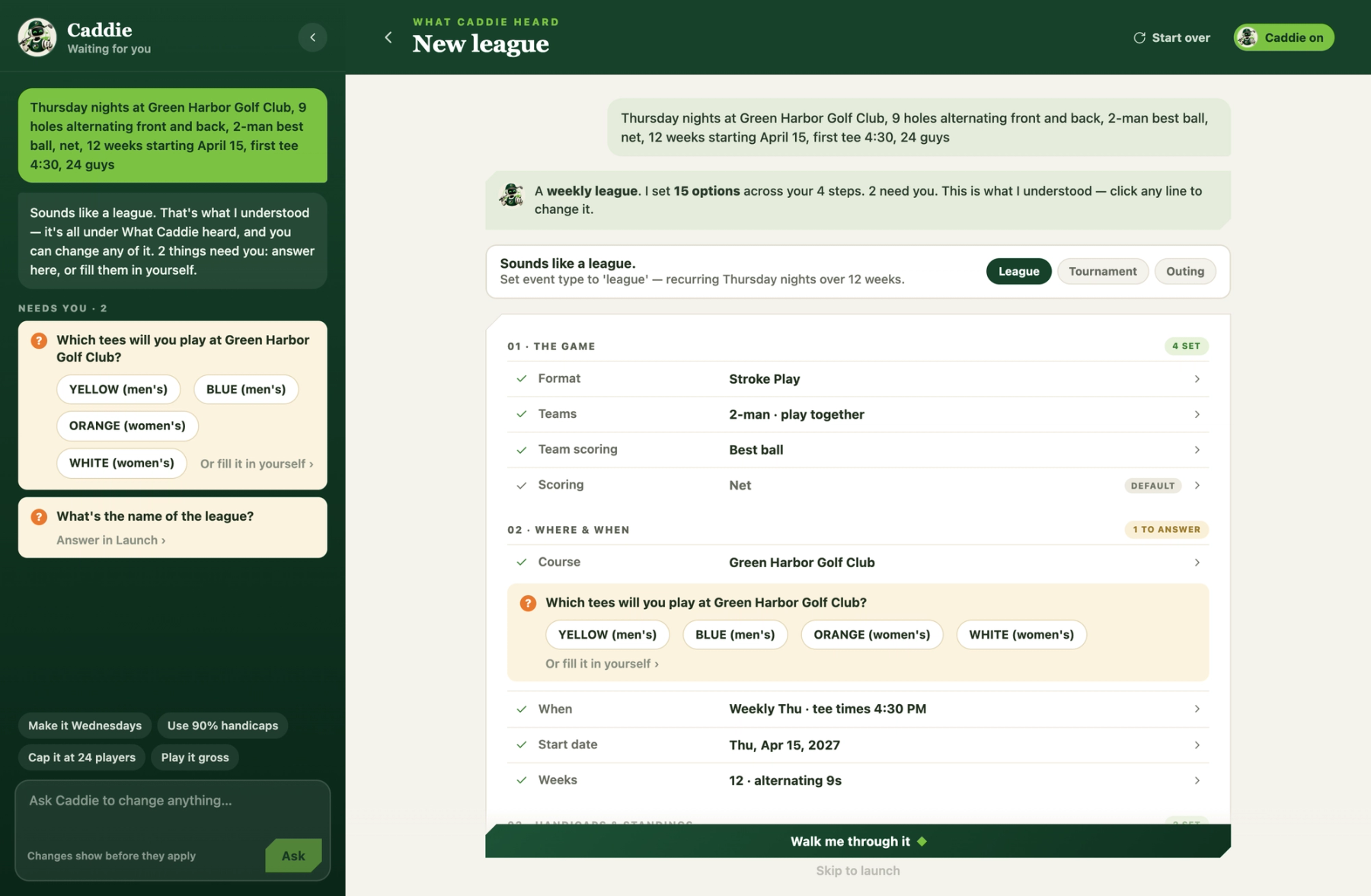
  2. Caddie shows what it heard and asks about anything it couldn’t settle
  3. Click any line to change it, or ask Caddie for a change and apply it
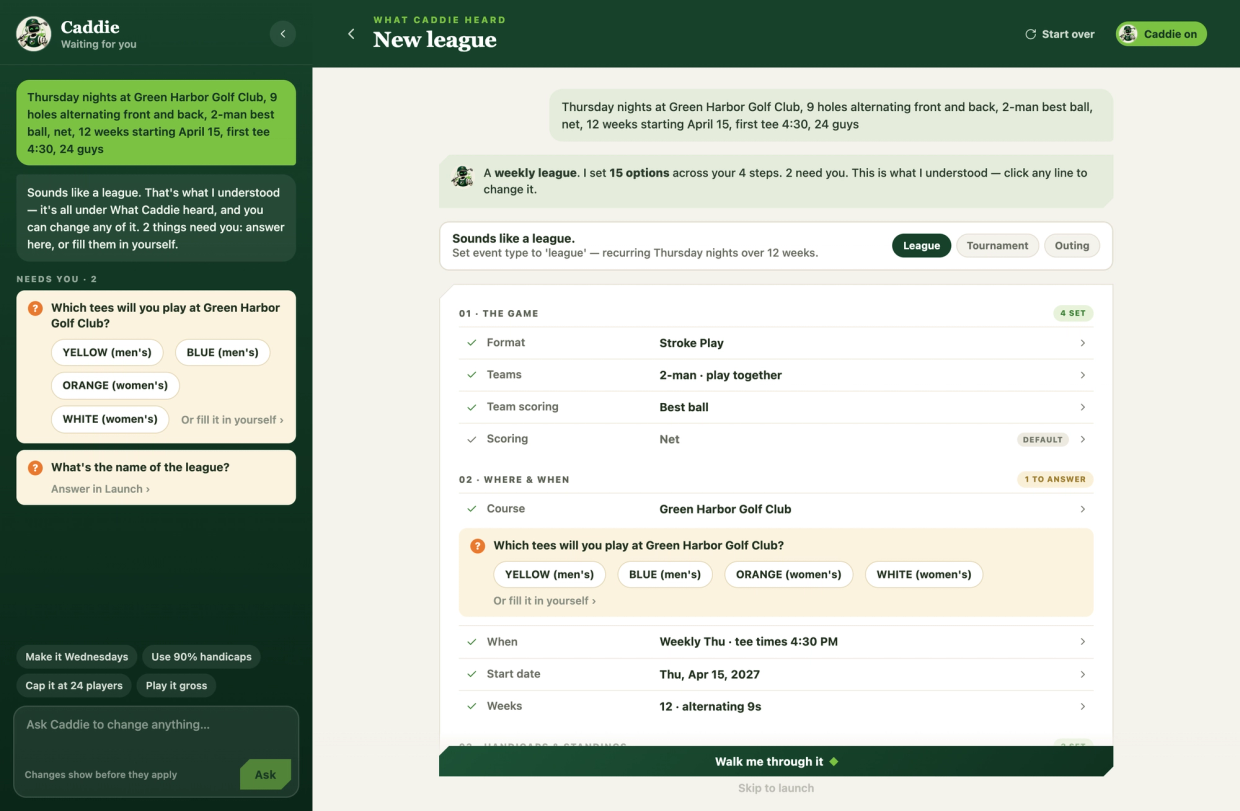
Caddie’s “What Caddie heard” summary for a Thursday night league: format, teams, course and schedule filled in, with one question about which tees to play
Every setting is tagged with who set it (Caddie, you, or a default), and nothing changes until you say so. Rather do it yourself? Reuse a past event or start fresh. Caddie is never forced on you.

Snap the paper scorecard

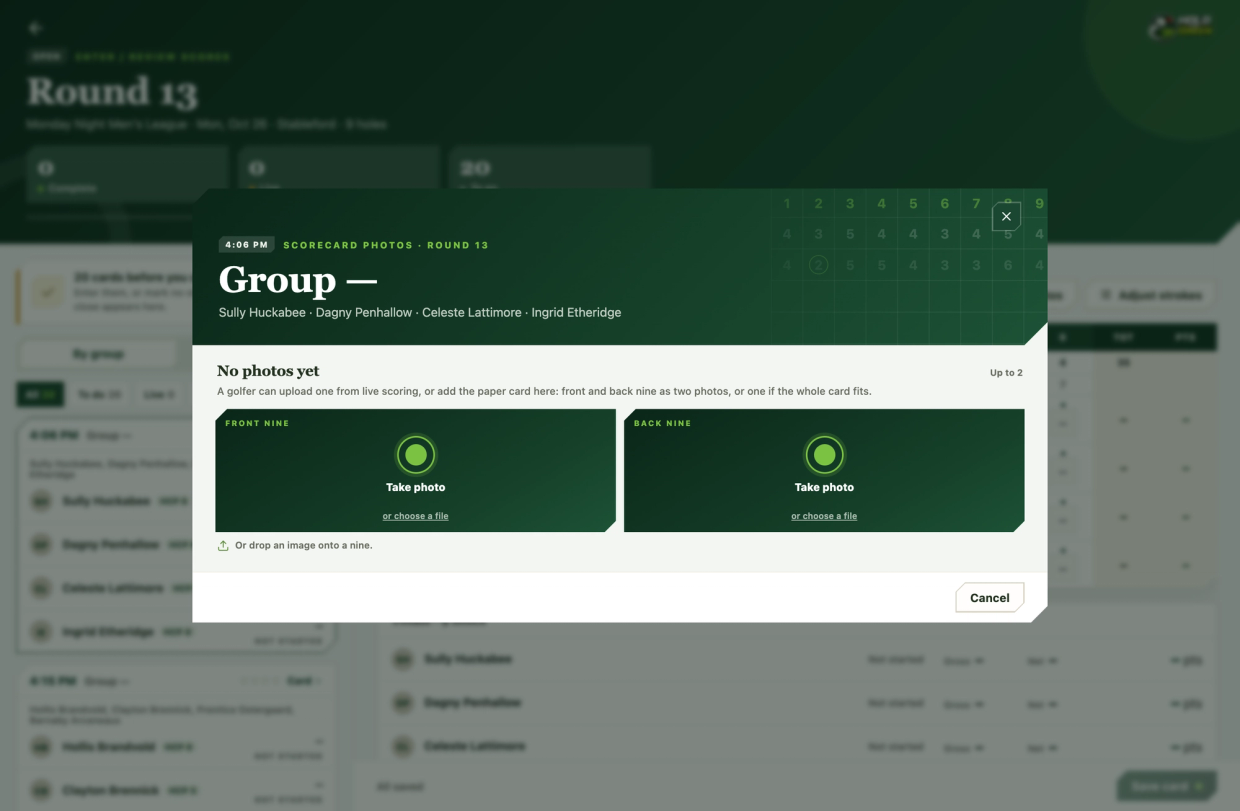
Photograph the card at the end of the round — front and back nine if it takes two shots — and every player’s hole-by-hole scores are drafted into the app. No squinting at someone’s handwriting while four people wait.

  1. Photograph the group’s card, or upload a picture
  2. Every player’s holes are read and drafted for you
  3. Check the highlighted reads, then save the card
The Enter Scores screen with the Scan scorecard dialog open, offering to take a photo or upload an image of the group’s paper scorecard
Anything the AI wasn’t sure about comes back flagged, nothing is saved until you’ve checked it, and every scan is kept so you can pull the original photo back up later.

We never let the AI have the last word. It drafts, you decide — nothing is applied to your event or saved to a scorecard until you’ve looked at it and said yes.