
Creating a League or Tournament
Create event on your dashboard opens one builder for leagues, tournaments and outings, with Caddie, our AI helper, beside it. If your plan allows hosting, or you haven’t used your free trial yet, you can start one.
Three ways to start
Tell Caddie about it. Type your event to Caddie the way you’d text your group, or tap the mic and say it: “Tuesday nights at Pebble Creek, 9 holes, 2-man best ball, 10 weeks from Nov 3.” Then click Build it with Caddie. Leave the kind on Let Caddie decide and it works out whether that’s a league, a tournament or an outing, or pick one yourself first.
Reuse an event. Copies the course, schedule and scoring of an event you’ve run before, with the dates moved to the next season. Players don’t come over; you can bring them in after launch.
Start fresh. The same four steps, filled in by you. Caddie is never forced on you.
What Caddie heard
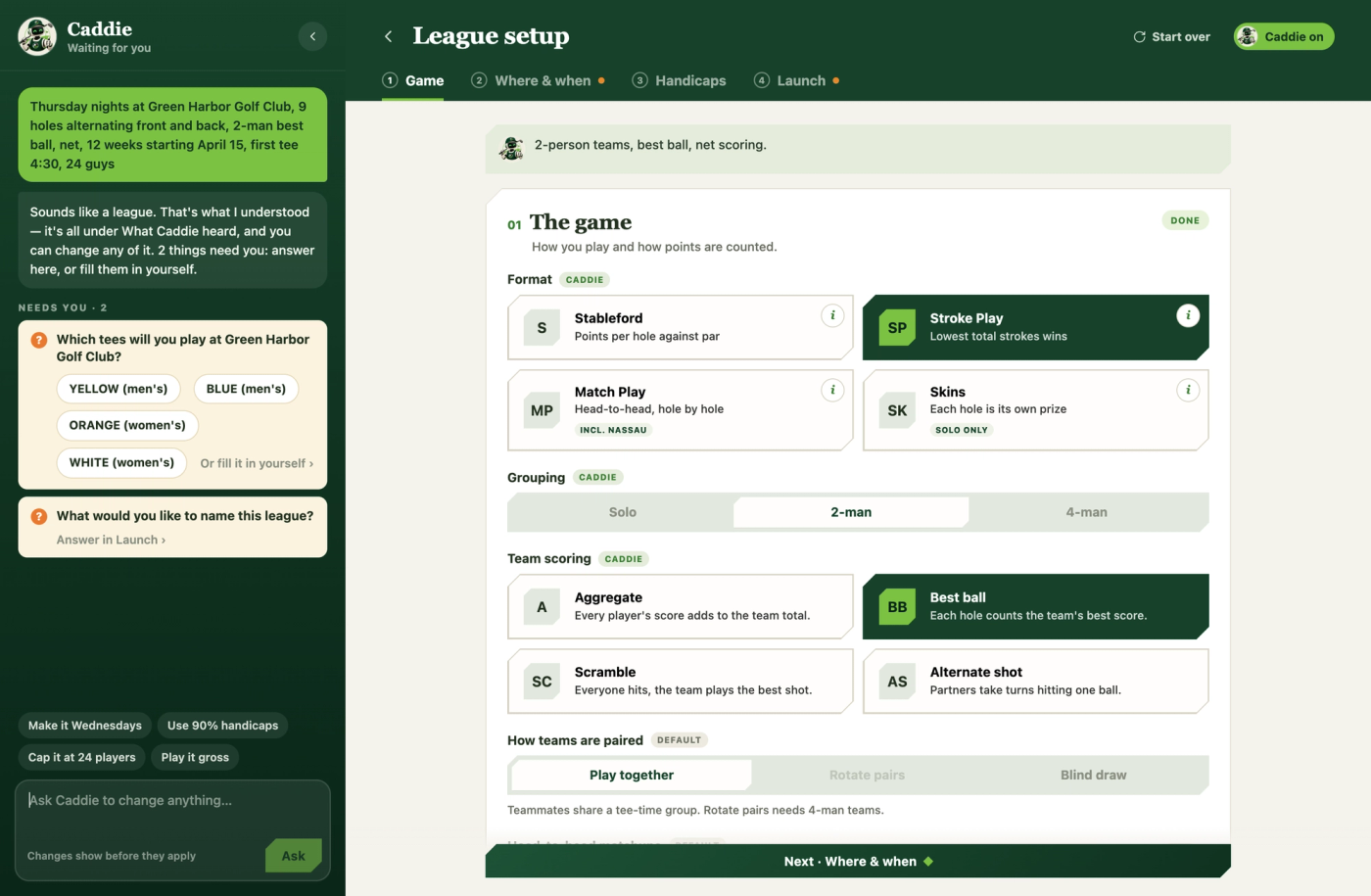
After you describe it, Caddie shows what it understood, step by step. Click any line to change it: it opens that setting, highlighted. Anything Caddie couldn’t settle is flagged with a question you can answer in one click, fill in yourself, or ask Caddie to fill in. Then choose Walk me through it, or Skip to launch once nothing needs you.
With Caddie on, every setting is tagged with who set it (Caddie, you, a default, or copied from a past event), and you can keep asking for changes from the Caddie panel (“make it Wednesdays”). It shows the change first and only makes it when you click Apply.
The four steps
1. Game. The format (Stroke Play, Stableford, Match Play, Skins, Blind Draw, or for a tournament the specialized Ryder Cup format) and how it’s played: grouping, team scoring, pairing, head-to-head, Stableford points, gross or net. Not sure what a format is? Click the ⓘ on its card for how it’s scored, team play and an example. See Format & Scoring Options Explained for exactly what every setting does.
2. Where & when. The course and the tee everyone plays, then the schedule. For a league: the day, first tee time and spacing, start date, number of weeks and round length. For a tournament: its rounds, each with its own date and start (tee times or a shotgun). If your event moves between courses, turn on multiple courses and add each one; scores and course handicaps follow the course each round is actually played on.
Can't find your course? After the search (and the wider deep search) comes up empty, there's a "Still can't find it? Request this course" link that opens a support request with the course name already filled in, so it can get added.
3. Handicaps. Handicap allowance, course handicaps, standings, a tournament’s cut, who’s eligible, and what happens when someone misses a round.
4. Launch. The name, field size, public or private, dues and how players pay, an indoor venue, full-card scoring and side games, then Review & launch. Launch stays off until nothing’s missing, and Show what’s missing takes you straight there. After launch you can bring in players from a past event or share the invite, and you land on the new event’s page.
Reusing a previous event
Reuse an event copies the format, course and tees, and schedule shape of one you’ve run before, with the dates moved to the next season, so you’re only adjusting what’s actually different this time. Players don’t come over automatically; bring them in after launch.